Samsung (Tizen)
Press the Home button on the remote, go to Apps (the four-square icon), then use the magnifier to search an app by name. You may be asked to sign in with a Samsung account.
Device setup · Samsung and LG
Watching IPTV on Samsung TV or LG TV needs no extra box: you install a player app from the television's own store and attach your weweb IPTV subscription to it. This page, part of our IPTV setup guide, explains which apps run on Samsung (Tizen) and LG (webOS), the difference between MAC-address apps and login apps, and the setup from start to finish.
Samsung and LG are the two most common smart TV brands in Moroccan homes, from Casablanca flats to family houses in the Souss. The same steps work for a Moroccan family abroad with an LG in Brussels or a Samsung in Manchester: your IPTV Morocco line works wherever the TV is connected.
Yes, on most Samsung and LG smart TVs sold in recent years. Samsung televisions run Tizen, and LG televisions run webOS. Both have an app store where several IPTV players are listed. You install one of them, then link your subscription to it.
Very old sets, or the cheapest models with a limited store, may not list any player. In that case an Android TV box or a Fire TV Stick plugged into the HDMI port gives you every app, and it costs less than a new TV. See IPTV on Firestick for the stick option.
Press the Home button on the remote, go to Apps (the four-square icon), then use the magnifier to search an app by name. You may be asked to sign in with a Samsung account.
Press Home, open the LG Content Store (on recent models simply Apps), then search. Sign in with an LG account if the TV asks.
Before installing, check that the TV is connected (Settings → Network) and that its software is up to date. An outdated system is a frequent reason why an app refuses to install.
The players available on Samsung and LG fall into two families, and knowing which one you have saves a lot of time.
| MAC-address apps | Login apps | |
|---|---|---|
| How you add the line | On the developer's website, from a phone, using the MAC address shown on the TV | On the TV, typing a server URL, username and password |
| Format used | M3U link (some also accept Xtream) | Xtream Codes |
| App licence | Usually a trial, then a paid activation to the app developer | Depends on the app |
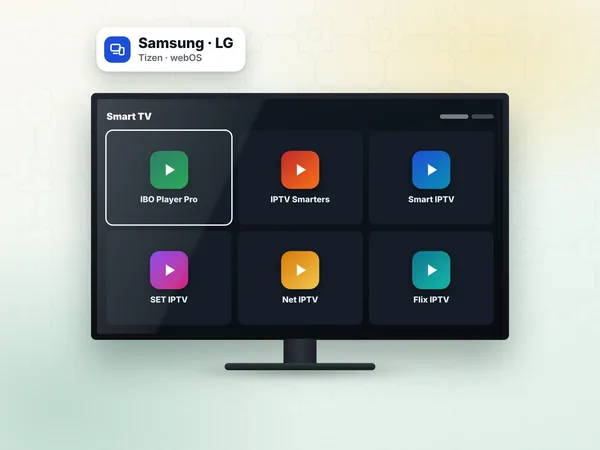
| Examples | Smart IPTV, SET IPTV, Net IPTV, Flix IPTV, IBO Player Pro | Login-based players listed in some TV stores |
The MAC-address family is the most common on Samsung and LG because you never type a long link with the remote. Your access message contains both formats, so you can use either.
All the apps below play your line. Choose according to what your TV lists and the layout you like.
A modern layout, accepts M3U or Xtream, and is also on Android boxes. Steps on IBO Player Pro.
IBO Player Pro guideA simple, long-standing player for M3U links, popular on LG. See Smart IPTV.
Smart IPTV guideHere is the full route with a MAC-address app, the most common case on a Samsung. On an LG, only the name of the store changes.
Connect the TV to your router, ideally with a network cable, and check the connection in Settings → General → Network.
Press Home → Apps, search for the player you chose and install it.
Open the app: it shows a MAC address (and sometimes a device key). Take a photo of the screen.
Order your plan or request the free 24-hour test. We send your M3U link and Xtream details on WhatsApp.
On your phone, open the website shown in the app, enter the MAC address (and key), then paste your M3U link, or fill in the Xtream fields if the site offers them.
Close the app on the TV completely and open it again. The channel groups appear.
Play a channel from the Morocco group, then add your favourites.
Your model or region does not list it. Try another player from the list above, or use a box or stick on HDMI.
The app's own trial is over. Its activation is paid to the app developer on their website, at the price they show. It is separate from your plan.
TV Wi-Fi chips are often weaker than a phone's. A cable or a 5 GHz network makes a big difference.
Buffering, black screen or login errors: follow IPTV troubleshooting.
A Full HD television is well served by Standard (300 DH). A 4K Samsung or LG benefits from Premium (450 DH), with 4K where the channel broadcasts in 4K and the full sports packs. To install the access on two TVs used one at a time, VIP (600 DH) covers 1 or 2 devices; each TV then needs its own app (and its own app activation if the app requires one).
Your access arrives on WhatsApp within 1 hour, 24 h at most. Compare the three options on the IPTV subscription page.
Answers
Yes, on most recent Samsung (Tizen) and LG (webOS) TVs. Install a player such as IBO Player Pro, Smart IPTV or SET IPTV from the TV's store and attach your line; on very old models, a Fire TV Stick or Android box does the job.
A MAC-address app shows an identifier on the TV and you attach your playlist on the developer's website from a phone. A login app asks you to type the server URL, username and password on the TV itself. The weweb access works with both, because it comes as an M3U link and as Xtream Codes.
Choose a 12-month plan, install a player from your TV's store, and we send your access on WhatsApp with help to attach it. No box, no dish, no technician.